
Hybrid Deployment (K8s Control Plane + Bare-Metal / VM Data Plane)
This guide explains how to deploy CubeSandbox in a hybrid topology: the control plane runs in Kubernetes via the official Helm Chart, while the data plane (compute nodes) runs directly on physical machines, bare-metal servers, or standard VMs (using native KVM or PVM) and registers to the Kubernetes control plane.
Why Choose Hybrid Deployment?
- Cloud-native control plane operations:
cube-master,cube-templatecenter,cube-api,cube-ops,cube-proxy,cube-lifecycle-manager, andcube-webuirun on Kubernetes, giving you multi-replica high availability, rolling upgrades, self-healing, observability, and standard Ingress / LoadBalancer integration out of the box. - Zero Kubernetes coupling on the data plane: Compute nodes run directly on physical machines or VMs without deploying privileged
cube-nodeDaemonSets into Kubernetes. This avoidshostNetworkconflicts with CNI plugins (such as Cilium eBPF) or Pod Security Admission policies, and protects running sandboxes from kubelet eviction or Pod recreation.
Production Security Notice
Before exposing your cluster to untrusted networks, read Network Hardening and Authentication. CubeMaster (8089), CubeOps (3010), Cubelet gRPC (9999), and ops-agent (8890) are internal control links — never expose them to the public internet; restrict them to private cluster networks only.
1. Architecture Overview
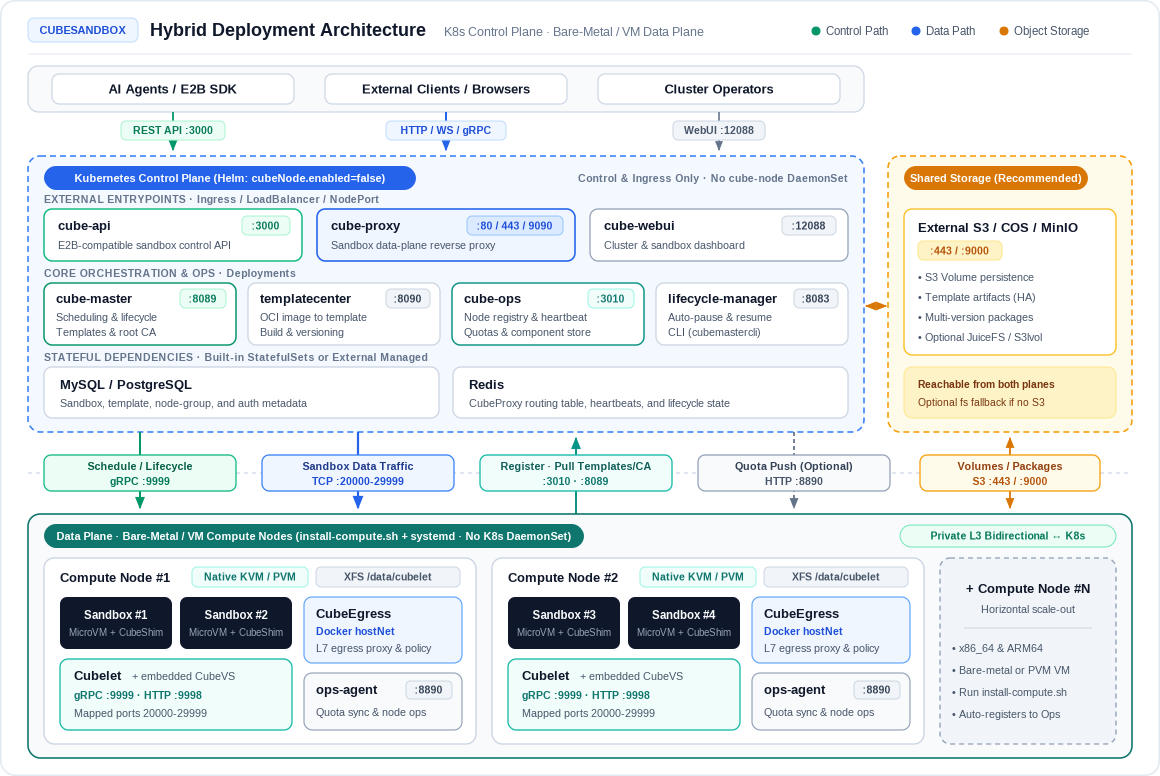
Component Responsibilities
| Layer | Deployment Runtime | Components | Responsibilities |
|---|---|---|---|
| Control Plane & Entrypoints | Kubernetes (Helm Chart, cubeNode.enabled=false) | cube-master, cube-templatecenter, cube-api, cube-ops, cube-proxy, cube-lifecycle-manager, cube-webui, cubemastercli; optional built-in observability (prometheus, loki/elasticsearch, grafana, component-otelcol) | Scheduling, template build & distribution, E2B API, node management, sandbox traffic proxying, auto-pause/resume, WebUI console, optional centralized monitoring & dashboards |
| Stateful Dependencies | K8s built-in StatefulSets or external managed services | MySQL / PostgreSQL, Redis, S3 / COS / MinIO | Metadata persistence, routing & lifecycle state, Volumes / template artifacts / component warehouse |
| Data Plane (Compute Nodes) | Physical machines / bare metal / VMs (install-compute.sh + systemd) | Cubelet (with embedded network runtime / CubeVS), CubeShim, CubeEgress, ops-agent; optional cube-sandbox-otelcol | MicroVM sandbox runtime, node status reporting, transparent L7 egress proxy & policy enforcement, dynamic quota sync, optional sandbox metrics & log collection |
2. Prerequisites
2.1 Control Plane Requirements (Kubernetes Cluster)
| Item | Requirement | Notes |
|---|---|---|
| Kubernetes | >= v1.24 | Managed (TKE, EKS, GKE, AKS, etc.) or self-hosted Kubernetes |
| CLI tools | kubectl, Helm >= v3.10 | With permissions to run helm upgrade --install in the target namespace |
| Control-plane nodes | >= 1 node (3+ recommended for production); >= 4 vCPU, 8 GiB RAM each | Label control-plane nodes with cube.tencent.com/cube-control=true; do not add cube-node=true |
| Persistent storage & stateful services | External HA MySQL (or PostgreSQL), HA Redis, and external S3 recommended | Combined with controlPlane.artifactStore.s3Backed: true, the K8s control plane stays stateless and does not require K8s PVCs / StorageClass. An available StorageClass (configurable via persistence.storageClassName) is only needed for non-production setups using the chart's built-in MySQL / Redis or fs artifact mode |
| Service exposure | Internal LoadBalancer (recommended) or NodePort | Out-of-cluster compute nodes must reach cube-master (8089) and cube-ops (3010); clients must reach cube-api, cube-proxy, and cube-webui |
| Container images | Connectivity to official registries, or import images into a private registry | Default global registry: cube-sandbox-int.tencentcloudcr.com (in mainland China, add -f deploy/kubernetes/chart/values-cn.yaml to use cube-sandbox-cn.tencentcloudcr.com). For air-gapped or private registry deployments, see Section 5: Offline & Private Registry Deployment |
2.2 Data Plane Requirements (Bare-Metal / VM)
Each physical machine or VM serving as a compute node must satisfy:
- Virtualization capability (choose one):
- Physical machine / bare-metal server / VM with nested virtualization:
x86_64oraarch64(ARM64) Linux host with native/dev/kvmavailable (ls -la /dev/kvm). - Standard cloud VM without
/dev/kvm:x86_64only. Install the PVM host kernel first and reboot (recommended OS: OpenCloudOS 9; Ubuntu, Debian, RHEL, and CentOS are also supported), then deploy withCUBE_PVM_ENABLE=1.
- Physical machine / bare-metal server / VM with nested virtualization:
- Hardware specs: Minimum 4 vCPU, 8 GiB RAM, >= 50 GB system disk; for production, 16 vCPU, 32 GiB+ RAM with a dedicated data disk is recommended.
- Filesystem (mandatory):
/data/cubeletmust be on an XFS filesystem (df -T /data/cubeletreportsxfs). Otherwiseinstall-compute.shfails fast during preflight. For production, format and mount a dedicated data disk as XFS at/data/cubelet. - Container runtime (mandatory): Docker installed and running (Snap Docker is not supported and rejected by preflight). Even though compute nodes run MicroVMs rather than Docker containers for sandboxes,
cube-egressruns as a host-network Docker container. - Kernel, cgroup & privileges: Linux kernel >= 5.4 (
uname -r), cgroup v2 must have thecpucontroller enabled (or use cgroup v1), and installation requires root privileges. - Version parity: Use the same release version of the one-click bundle (
cube-sandbox-one-click-<version>.tar.gz) as the Helm Chart component images.
2.3 Network Connectivity & Port Matrix
The most important requirement for hybrid deployment is bidirectional L3 reachability between Kubernetes control-plane Pods and bare-metal / VM compute nodes:
- K8s Pods -> Compute Nodes directly routable:
cube-master,cube-ops, andcube-proxyPods must be able to route directly to each compute node'sCUBE_SANDBOX_NODE_IP. Place the K8s cluster and compute nodes in the same VPC / routable private network, and allow traffic from the K8s Pod CIDR and Node CIDR in compute-node security groups / firewalls. - Compute Nodes -> K8s Control Plane reachable: Compute nodes must be able to reach the exposed
cube-master(8089or NodePort) andcube-ops(3010or NodePort) addresses. - Non-overlapping CIDRs: The compute-node CubeVS sandbox CIDR
CUBE_SANDBOX_NETWORK_CIDR(default192.168.0.0/18, prefix/16–/24) must not overlap with host interface subnets, VPC CIDR, Kubernetes Pod CIDR, or Kubernetes Service CIDR.
| Direction | Source | Destination | Port / Protocol | Purpose | Exposure Guidance |
|---|---|---|---|---|---|
| Data Plane -> Control Plane | Compute Node (Cubelet / ops-agent) | K8s cube-ops Service | 3010/tcp (or NodePort) | Node registration, heartbeat, ops-agent quota pull, fs-backend warehouse blobs | Private network only |
| Data Plane -> Control Plane | Compute Node (Cubelet / CubeEgress) | K8s cube-master Service | 8089/tcp (or NodePort) | Pull CubeEgress MITM root CA (/cube/ca/*), download template rootfs artifacts, health check | Private network only |
| Data Plane -> Object Store | Compute Node (Cubelet / s3fs) | External S3 / COS / MinIO | 443/tcp or 9000/tcp | S3 Volume mounts, S3 warehouse presigned GET (optional JuiceFS / CubeS3lvol) | Private network / object-store endpoint |
| Control Plane -> Data Plane | K8s cube-master Pod | Compute Node (Cubelet gRPC) | 9999/tcp | Sandbox create/destroy/pause/resume, template distribution, snapshots | K8s Pod/Node CIDR only |
| Control Plane -> Data Plane | K8s cube-proxy Pod | Compute Node (CubeVS port mappings) | 20000-29999/tcp | Forward sandbox HTTP / HTTPS / WebSocket / gRPC traffic | K8s Pod/Node CIDR only |
| Control Plane -> Data Plane | K8s cube-ops Pod | Compute Node (ops-agent) | 8890/tcp | Real-time quota config push (falls back to 300s pull reconcile if blocked) | K8s Pod/Node CIDR only |
| Client -> Entrypoint | SDKs / Backend Services | K8s cube-api Service | 3000/tcp (or LB/NodePort) | E2B-compatible sandbox management API | Private or public (enable Auth if public) |
| Client -> Entrypoint | SDKs / Browsers | K8s cube-proxy Service / Ingress | 80/tcp, 443/tcp, 9090/tcp | Sandbox data-plane gateway (*.domain / /sandbox/...) | Private or public as needed |
| Operator -> Entrypoint | Admin Browser | K8s cube-webui Service | 12088/tcp (or port-forward) | WebUI dashboard | Private network / IP allowlist only |
| Data Plane -> Observability (Optional) | Compute Node (cube-sandbox-otelcol) | External or K8s-exposed Prometheus | 9092/tcp (or external metrics port) | OTLP/HTTP (/api/v1/otlp) or Remote Write sandbox metrics ingestion | Private network only |
| Data Plane -> Observability (Optional) | Compute Node (cube-sandbox-otelcol) | External or K8s-exposed Loki / Elasticsearch | 3100/tcp (Loki) or 9200/tcp (ES) | OTLP/HTTP (/otlp) or ES bulk sandbox log ingestion | Private network only |
| Operator -> Observability (Optional) | Admin Browser | External or K8s cube-grafana Service | 3001/tcp (or port-forward) | Pre-provisioned cluster, node, sandbox, and log dashboards | Private network / IP allowlist only |
2.4 Time Synchronization (Mandatory)
Enable consistent time synchronization (chrony, ntpd, systemd-timesyncd, or PTP) on all Kubernetes control-plane nodes and all bare-metal / VM compute nodes.
Keep clock skew well below 15 seconds
If a compute node's clock lags behind the control plane, its heartbeats can appear older than the 15-second expiry window, causing CubeOps / CubeMaster to mark the node unhealthy and skip it for scheduling and template distribution.
2.5 Persistent Storage, External Dependencies & Observability Planning
For production, using external HA MySQL (or PostgreSQL), external HA Redis (managed primary/replica, Sentinel, or Redis Cluster), and external shared S3 / COS / MinIO is strongly recommended so the Kubernetes control plane remains stateless and easy to scale horizontally:
- External Database (MySQL / PostgreSQL): Setting
mysql.host(ordatabase.driver: postgreswithpostgres.host) automatically skips the chart's built-in MySQL StatefulSet. - External HA Redis: Supports single-endpoint managed HA (
redis.host), Redis Sentinel (redis.masterName+redis.sentinelNodes), and native Redis Cluster (redis.clusterNodes). Configuring any external mode automatically skips the built-in Redis StatefulSet. - Object Storage (avoid the in-cluster MinIO Headless Service): The chart's built-in MinIO uses a Headless Service (
clusterIP: None), which is only reachable via in-cluster DNS and cannot be dialed directly by out-of-cluster bare-metal / VM compute nodes. Choose one of the following options before installing:- Option A: External HA shared S3 / COS / MinIO (Recommended — full features & multi-replica HA)
- Provision an S3-compatible object store (such as AWS S3, Tencent Cloud COS, or standalone HA MinIO) reachable from both Kubernetes Pods and bare-metal / VM compute nodes.
- Disable built-in MinIO (
minio.enabled: false), configurevolumeS3.*, and enablecontrolPlane.artifactStore.s3Backed: true(cubeOpswarehouse, S3 Volumes, and template artifacts all reuse it; for multi-replica HA control planes, also setcontrolPlane.master.persistence.enabled: falseandcontrolPlane.templateCenter.colocateWithMaster: falseto remove K8s PVC coupling completely). - Configure the matching
CUBE_S3_*variables in.envon each compute node so S3 Volumes and the component warehouse work end-to-end.
- Option B: No external S3 (Filesystem / PVC mode — minimal setup)
- Disable built-in MinIO (
minio.enabled: false) and S3 artifact storage (controlPlane.artifactStore.s3Backed: false), switch both template artifacts and the component warehouse to filesystem storage (controlPlane.artifactStore.backend: fs,cubeOps.store.backend: fs), enablecontrolPlane.master.persistence.enabled: truewithcontrolPlane.templateCenter.colocateWithMaster: true, and setcubeOps.store.fs.publicURLto the node-reachablehttp://<K8s-CubeOps-Reachable-Addr>(requires an availableStorageClass). With the defaultReadWriteOncePVC, setreplicas: 1formaster,templateCenter, andcubeOps(multi-replicafsmode requires aReadWriteManyshared PVC such as CFS/NFS). - Template builds, template distribution, and component warehouse downloads work over HTTP without S3; the S3 Volume plugin remains disabled (compute-node install logs a warning and continues).
- Disable built-in MinIO (
- Option A: External HA shared S3 / COS / MinIO (Recommended — full features & multi-replica HA)
- Observability Planning (Optional: Metrics, Logs & Dashboards): Because sandboxes run on bare-metal / VM hosts outside Kubernetes (
cube-node-otelcolschedulesDESIRED=0Pods in hybrid mode, which is expected), sandbox resource metrics andstdout/stderrlogs are collected by the local systemd servicecube-sandbox-otelcol.serviceon each compute node. To enable observability, choose one of two backend options (for full metric semantics and PromQL/LogQL queries, see Sandbox Observability Deployment; for request tracing, see Distributed Tracing):- External Observability Platform (Recommended for Production): Push directly from compute nodes to your existing Prometheus (or VictoriaMetrics) + Loki / Elasticsearch + Grafana stack. No built-in observability components are needed in Kubernetes (you can still optionally enable
observability.logs.components.enabled: trueto ship K8s control-plane container logs). - Built-in Observability Stack on Kubernetes (Turnkey): Enable
observability.enabled: truein Helm to deploy Prometheus (9092) + Loki (3100) or Elasticsearch (9200) + Grafana (3001, with 4 pre-provisioned dashboards; requires aStorageClass). Because the chart createsClusterIPServices by default, apply companion internalLoadBalancer/NodePortServices so out-of-cluster compute nodes can ingest metrics and logs.
- External Observability Platform (Recommended for Production): Push directly from compute nodes to your existing Prometheus (or VictoriaMetrics) + Loki / Elasticsearch + Grafana stack. No built-in observability components are needed in Kubernetes (you can still optionally enable
3. Deployment Steps
High-level installation workflow:
1. Label Kubernetes control-plane nodes (and optional taint)
    ↓
2. Prepare control-plane Helm values (cubeNode.enabled=false + Service exposure + storage + optional observability)
    ↓
3. Install the control plane with Helm and record the CubeMaster / CubeOps (and optional Prometheus / Loki) endpoints
    ↓
4. Prepare bare-metal / VM compute nodes (KVM or PVM kernel, XFS disk, Docker, NTP)
    ↓
5. Configure .env (including optional observability Collector) on each compute node and run install-compute.sh
    ↓
6. Configure multi-node scheduler scoring and client access
Step 1: Deploy the Kubernetes Control Plane
1.1 Verify the cluster and label control-plane nodes
kubectl get nodes -o wide
kubectl get storageclass
helm version --short
Label the Kubernetes node(s) that will host the CubeSandbox control plane with cube-control=true:
kubectl label nodes <control-node-1> cube.tencent.com/cube-control=true --overwrite

# Optional: taint control-plane nodes to keep unrelated workloads off them
# kubectl taint nodes <control-node-1> cube.tencent.com/control=true:NoSchedule --overwrite
Do not label K8s nodes as compute nodes
Because the data plane runs on external physical machines / VMs, do not add cube.tencent.com/cube-node=true or cube.tencent.com/allow-pvm-bootstrap=true to Kubernetes nodes.
1.2 Prepare the Helm values file
Create hybrid-control-plane-values.yaml in a dedicated local deployment directory (for example, ~/cube-deploy/, kept separate from the source repository to protect database, Redis, and S3 credentials). The example below uses the recommended production setup with external HA MySQL + external HA Redis + external S3 (if using a private registry, merge the private-registry fields from Section 5: Offline & Private Registry Deployment into this file):
# Key switch: disable all in-cluster compute DaemonSets (cube-node / installer / bootstrap / pvm)
cubeNode:
  enabled: false

# --- External HA Database (Recommended; setting host skips built-in MySQL StatefulSet) ---
database:
  driver: mysql              # Set to postgres and configure postgres.* below for external PostgreSQL
mysql:
  host: "<ha-mysql-host>"
  port: 3306
  database: "cube_mvp"
  user: "cube"
  password: "<mysql-password>"

# For external PostgreSQL:
# postgres:
#   host: "<ha-postgres-host>"
#   port: 5432
#   database: "cube_mvp"
#   user: "cube"
#   password: "<postgres-password>"

# --- External HA Redis (Recommended; automatically skips built-in Redis StatefulSet) ---
# Mode 1: Managed HA Redis single endpoint (use FQDN or IP literal)
redis:
  host: "<ha-redis-host>"
  port: 6379
  password: "<redis-password>"
  db: 0
# Mode 2: Redis Sentinel (leave redis.host empty)
#   masterName: "mymaster"
#   sentinelNodes: "10.0.0.11:26379,10.0.0.12:26379,10.0.0.13:26379"
#   sentinelPassword: ""
# Mode 3: Redis Cluster (leave redis.host and masterName empty; db must be 0)
#   clusterNodes: "10.0.0.21:6379,10.0.0.22:6379,10.0.0.23:6379"

# --- Expose control-plane Services for external bare-metal / VM compute nodes ---
controlPlane:
  artifactStore:
    s3Backed: true           # Store template artifacts in S3 for stateless multi-replica HA
  master:
    replicas: 2              # Recommended >= 2 for production; set 1 for single-replica trials
    persistence:
      enabled: false         # No RWO PVC needed when s3Backed=true
    service:
      # Prefer an internal LoadBalancer (cloud internal LB / MetalLB),
      # or use NodePort and inspect the allocated port with kubectl get svc
      type: LoadBalancer
      port: 8089
  templateCenter:
    replicas: 2              # Supports multiple replicas with s3Backed=true; set 1 for trials
    colocateWithMaster: false
  api:
    replicas: 2
    sandboxDomain: "cube.app"
    service:
      type: LoadBalancer     # Or NodePort (optionally set nodePort: 30030)
      port: 3000

cubeOps:
  enabled: true
  replicas: 2
  service:
    type: LoadBalancer       # Or NodePort
    port: 3010

# --- Data-plane proxy and WebUI ---
cubeProxy:
  enabled: true
  domain: "cube.app"
  advertiseIP: ""            # Optional external IP hint
  # Set to false if modifying kube-system/coredns is restricted in your cluster
  configureClusterDNS: true
  service:
    type: LoadBalancer       # Or NodePort with service.nodePorts.{http,https,grpc}
  ingress:
    enabled: false           # Set true (with service.type: ClusterIP) if exposing via Ingress
  tls:
    mode: selfSigned         # Trial only; use existingSecret or certManager in production

webui:
  enabled: true
  service:
    type: ClusterIP          # Recommended with port-forward or an internal LB

# --- External HA Shared S3 / COS / MinIO (Recommended) ---
minio:
  enabled: false

volumeS3:
  endpoint: "https://<s3-endpoint>"         # Must be reachable by both K8s Pods and compute nodes (MinIO example: http://<s3-endpoint>:9000)
  accessKeyId: "<s3-access-key>"
  secretAccessKey: "<s3-secret-key>"
  bucket: "cube-volumes"
  region: "us-east-1"
  pathStyle: false                          # Set true for MinIO / path-style S3 endpoints
  extraOpts: ""                             # Set "-ouse_path_request_style" for MinIO / path-style S3
Test / PoC only: Using built-in MySQL / Redis StatefulSets (requires StorageClass)
For quick trials without external database or Redis services, leave host empty in mysql and redis (the chart deploys single-replica StatefulSets with PVCs; you must still replace the default CHANGE_ME_* passwords):
mysql:
  host: ""
  password: "replace-me-mysql-password"
  rootPassword: "replace-me-mysql-root-password"

redis:
  host: ""
  password: "replace-me-redis-password"
Option B: Values snippet without external S3
If you do not have an external S3 / COS store, remove (or leave empty) the volumeS3 block above and update minio, controlPlane, and cubeOps as shown below so Helm chart validation passes (cubeOps.store.fs.publicURL must be reachable from compute nodes; if using NodePort, you can fill it in and re-run helm upgrade once the port is allocated):
minio:
  enabled: false

controlPlane:
  artifactStore:
    backend: fs
    s3Backed: false            # Required: fs cannot be combined with s3Backed=true
  master:
    replicas: 1                # Single replica with default RWO PVC; multi-replica requires a ReadWriteMany PVC (e.g. CFS/NFS)
    persistence:
      enabled: true            # Required: fs backend requires master.persistence.enabled=true
  templateCenter:
    replicas: 1
    colocateWithMaster: true   # Required to share the default RWO artifact PVC with master

cubeOps:
  replicas: 1                  # Multi-replica fs mode requires cubeOps.store.fs.persistence with ReadWriteMany
  store:
    backend: fs
    fs:
      publicURL: "http://<K8s-CubeOps-Reachable-IP>:<port>"
Managed K8s (TKE / EKS / GKE / ACK): Need internal-LB annotations or fixed NodePorts?
In the current chart templates, controlPlane.master.service and cubeOps.service expose type and port without custom annotations. If your cloud controller provisions public LoadBalancers by default, keep both set to type: ClusterIP and apply a companion Service manifest with your provider's internal-LB annotations (or fixed NodePorts) targeting the same Pod selectors so 8089 and 3010 stay strictly internal:
apiVersion: v1
kind: Service
metadata:
  name: cube-master-internal
  namespace: cube-system
  annotations:
    # Add your cloud provider's internal LoadBalancer annotations here
spec:
  type: LoadBalancer
  selector:
    app.kubernetes.io/name: cube
    app.kubernetes.io/instance: cube
    app.kubernetes.io/component: master
  ports:
    - name: cubemaster
      port: 8089
      targetPort: cubemaster
---
apiVersion: v1
kind: Service
metadata:
  name: cube-ops-internal
  namespace: cube-system
  annotations:
    # Add your cloud provider's internal LoadBalancer annotations here
spec:
  type: LoadBalancer
  selector:
    app.kubernetes.io/name: cube
    app.kubernetes.io/instance: cube
    app.kubernetes.io/component: ops
  ports:
    - name: http
      port: 3010
      targetPort: http
Optional: Enable the chart's built-in observability stack on Kubernetes (Prometheus + Loki / ES + Grafana)
If you do not have an external observability platform and want to deploy the built-in stack on the Kubernetes control plane (requires an available StorageClass), append the block below to hybrid-control-plane-values.yaml (or save it as observability-values.yaml and pass an additional -f):
observability:
  enabled: true
  # Cluster label attached to metrics and logs; match CUBE_OBSERVABILITY_CLUSTER_ID on compute nodes
  clusterId: "cube-hybrid-prod"
  backend:
    enabled: true
    grafana:
      serviceType: ClusterIP        # Access via port-forward, or switch to an internal LB
      # For production, manage admin credentials via an external Secret:
      # existingSecret: "cube-grafana-admin-custom"
  logs:
    enabled: true
    backend: loki                   # Default: loki; set elasticsearch if preferred
    components:
      enabled: true                 # Optional: also collect K8s control-plane container logs
Required step (expose ingestion endpoints to out-of-cluster compute nodes): The chart creates cube-prometheus (9092) and either cube-loki (3100) or cube-elasticsearch (9200) (depending on observability.logs.backend) as ClusterIP Services, which external bare-metal / VM compute nodes cannot reach directly. After installing the chart, apply companion internal LoadBalancer (or NodePort) Services to expose the ingestion ports on your private network:
apiVersion: v1
kind: Service
metadata:
  name: cube-prometheus-internal
  namespace: cube-system
  annotations:
    # Add your cloud provider's internal LoadBalancer annotations; never expose publicly
spec:
  type: LoadBalancer                # Or NodePort when no internal LB is available
  selector:
    app.kubernetes.io/name: cube
    app.kubernetes.io/instance: cube
    app.kubernetes.io/component: prometheus
  ports:
    - name: http
      port: 9092
      targetPort: 9092
---
apiVersion: v1
kind: Service
metadata:
  name: cube-loki-internal
  namespace: cube-system
  annotations:
    # Add your cloud provider's internal LoadBalancer annotations; never expose publicly
spec:
  type: LoadBalancer                # Or NodePort when no internal LB is available
  selector:
    app.kubernetes.io/name: cube
    app.kubernetes.io/instance: cube
    app.kubernetes.io/component: loki
    # If using Elasticsearch, change component to elasticsearch and port/targetPort to 9200
  ports:
    - name: http
      port: 3100
      targetPort: 3100
Optional: Ship K8s control-plane container logs to an external observability platform
If you already run an external Prometheus + Loki / Elasticsearch + Grafana stack and only need sandbox telemetry from compute nodes, leave observability.enabled: false in Helm and jump directly to Step 3.2 (to import the 4 pre-built Grafana dashboards into an existing Grafana instance, run ./observability/install.sh dashboards as described in Sandbox Observability Deployment).
If you also want to forward Kubernetes control-plane container logs (cube-master, cube-api, cube-ops, cube-templatecenter, cube-proxy, cube-lifecycle-manager) into your external backend, append the snippet below (note: when observability.backend.enabled: false, chart validation requires setting observability.metrics.otlpEndpoint or remoteWriteUrl as well):
observability:
  enabled: true
  clusterId: "cube-hybrid-prod"
  backend:
    enabled: false
  metrics:
    otlpEndpoint: "https://prometheus.example.com/api/v1/otlp"
    # If your external backend requires authentication, create a Secret in cube-system and reference it:
    # auth:
    #   existingSecret: cube-observability-auth
    #   authorizationKey: metrics-authorization
    #   tenantIdKey: metrics-tenant-id
  logs:
    enabled: true
    backend: loki                                # Or elasticsearch
    otlpEndpoint: "https://loki.example.com/otlp"
    # esEndpoint: "https://es.example.com:9200"  # Used when backend=elasticsearch
    # auth:
    #   existingSecret: cube-observability-auth
    #   authorizationKey: logs-authorization
    #   tenantIdKey: logs-tenant-id
    components:
      enabled: true
1.3 Install the control plane with Helm
Mainland China Users
Add -f <chart-dir>/values-cn.yaml to the command below to pull images from the China-region registry.
Replace <chart-dir> with your local Helm chart directory (for example, CubeSandbox/deploy/kubernetes/chart) or a packaged .tgz chart archive, and pass the values file created in Step 1.2:
helm upgrade --install cube <chart-dir> \
  -n cube-system \
  --create-namespace \
  -f ~/cube-deploy/hybrid-control-plane-values.yaml \
  --wait \
  --timeout 30m
1.4 Record the exposed control-plane endpoints
kubectl get svc -n cube-system -o wideRecord the addresses that compute nodes will connect to:
MASTER_ADDR: Reachable<internal-lb-ip>:8089or<k8s-node-ip>:<master-nodeport>forcube-masterOPS_ADDR: Reachable<internal-lb-ip>:3010or<k8s-node-ip>:<ops-nodeport>forcube-ops- (Optional, when K8s built-in observability is enabled)
PROM_ADDRandLOKI_ADDR/ES_ADDR: Reachable internal LB or NodePort addresses forcube-prometheus-internal(9092) andcube-loki-internal(3100, or9200for Elasticsearch). Also retrieve the generated Grafana admin password (username:admin):
kubectl get secret -n cube-system \
  -l app.kubernetes.io/component=grafana-admin \
  -o jsonpath='{.items[0].data.admin-password}' | base64 --decode; echo
Also note the cube-api (3000) and cube-proxy (80/443/9090) entrypoints for verification and client access.
Step 2: Prepare Bare-Metal / VM Compute Nodes
Run all commands below as root (sudo su root) on each compute node.
2.1 Prepare virtualization (Native KVM or PVM)
Case A: Bare-metal server / physical machine / VM with nested virtualization (
x86_64oraarch64)Verify
/dev/kvmis present and accessible:bashls -la /dev/kvm lsmod | grep kvmCase B: Standard cloud VM without
/dev/kvm(x86_64only)Follow PVM Deployment — Step 1: Install the PVM Host Kernel to install the PVM host kernel and reboot:
- Download the matching RPM or DEB kernel package from a
kernel-release-*release on GitHub Releases (or CNB Releases). - Install the package, set it as the default GRUB entry, apply boot parameters with
host_grub_config.sh, and runreboot. - After rebooting, load and persist
kvm_pvm:
bashuname -r # Expected to include opencloudos9.cubesandbox.pvm.host modprobe kvm_pvm echo 'kvm_pvm' > /etc/modules-load.d/kvm-pvm.conf ls -la /dev/kvm lsmod | grep kvm_pvm- Download the matching RPM or DEB kernel package from a
2.2 Prepare an XFS filesystem for /data/cubelet
Check the filesystem type hosting /data/cubelet:
mkdir -p /data/cubelet
df -T /data/cubelet
If the type is not xfs, format and mount a dedicated data disk or partition as XFS (replace /dev/vdb with your unused block device):
mkfs.xfs /dev/vdb
mkdir -p /data/cubelet
mount /dev/vdb /data/cubelet

# Persist the mount across reboots
UUID="$(blkid -s UUID -o value /dev/vdb)"
echo "UUID=${UUID} /data/cubelet xfs defaults 0 0" >> /etc/fstab

df -T /data/cubelet
2.3 Verify Docker, time sync, and connectivity to the K8s control plane
# 1) Verify standard (non-Snap) Docker is running
docker info >/dev/null && which docker

# 2) Verify time synchronization
timedatectl status || chronyc tracking

# 3) Verify reachability to K8s control-plane endpoints recorded in Step 1.4
curl -fsS "http://<MASTER_ADDR>/notify/health"
curl -fsS "http://<OPS_ADDR>/health"
Proceed only after both health checks succeed.
Step 3: Deploy the Data Plane on Bare-Metal / VM
3.1 Download and extract the release bundle
Download the release bundle (cube-sandbox-one-click-<version>.tar.gz, or *-arm64.tar.gz for ARM64 bare metal) matching the version deployed in Kubernetes from GitHub Releases or CNB Releases:
tar -xzf cube-sandbox-one-click-<version>.tar.gz
cd cube-sandbox-one-click-<version>
3.2 Configure .env
cp env.example .envEdit .env and configure the following fields:
# Compute-only role
ONE_CLICK_DEPLOY_ROLE=compute

# Private IP of this physical machine / VM (must be directly routable from K8s control-plane Pods)
CUBE_SANDBOX_NODE_IP=<this-compute-node-ip>

# IMPORTANT: In K8s hybrid deployments, cube-master and cube-ops typically have
# different LoadBalancer IPs or NodePorts. Leave ONE_CLICK_CONTROL_PLANE_IP empty
# and explicitly configure both addresses below.
ONE_CLICK_CONTROL_PLANE_IP=
ONE_CLICK_CONTROL_PLANE_CUBEMASTER_ADDR=<MASTER_ADDR>   # e.g. 10.0.1.20:8089 or 10.0.1.10:31889
ONE_CLICK_CONTROL_PLANE_CUBEOPS_ADDR=<OPS_ADDR>         # e.g. 10.0.1.21:3010 or 10.0.1.10:31010

# Virtualization profile: 0 for bare metal / native KVM; 1 for PVM VMs
CUBE_PVM_ENABLE=0

# Override if the default 192.168.0.0/18 overlaps your VPC or K8s Pod/Service CIDRs (/16 to /24)
# CUBE_SANDBOX_NETWORK_CIDR=10.100.0.0/18

# Optional (mainland China): pull cube-egress image from the China-region registry
# MIRROR=cn
# Or point cube-egress directly at your private registry:
# CUBE_SANDBOX_CUBE_EGRESS_IMAGE=registry.internal.example.com/cube-sandbox/cube-egress:<version>

# If using Storage Option A (external S3), mirror the exact same S3 settings from Helm
# (scheme http/https, port, and path-style options must match Helm volumeS3)
CUBE_S3_ENDPOINT=https://<s3-endpoint>      # MinIO example: http://<s3-endpoint>:9000
CUBE_S3_ACCESS_KEY_ID=<s3-access-key>
CUBE_S3_SECRET_ACCESS_KEY=<s3-secret-key>
CUBE_S3_BUCKET=cube-volumes
CUBE_S3_REGION=us-east-1
CUBE_S3_S3FS_EXTRA_OPTS=                    # Set -ouse_path_request_style for MinIO / path-style S3

# --- Optional: Enable the node observability Collector (Cubelet metrics & sandbox logs) ---
# When endpoints are left unset in hybrid mode, auto-derivation falls back to the CubeMaster /
# CubeOps host (:9092 / :3100), which typically does not expose ingestion ports, so set them
# explicitly. Provide OTLP base URLs without trailing /v1/metrics or /v1/logs, and keep
# clusterId aligned with Helm observability.clusterId.
# ONE_CLICK_ENABLE_OBSERVABILITY=1
# ONE_CLICK_OBSERVABILITY_ROLE=cvm
# CUBE_OBSERVABILITY_CLUSTER_ID=cube-hybrid-prod
# CUBE_LOGS_BACKEND=loki                                      # Set elasticsearch if using ES
# CUBE_METRICS_OTLP_HTTP_ENDPOINT=http://<PROM_ADDR>/api/v1/otlp
# # Use Remote Write instead if your external Prometheus does not enable OTLP (mutually exclusive):
# # CUBE_METRICS_REMOTE_WRITE_URL=https://prometheus.example.com/api/v1/write
# CUBE_LOGS_OTLP_HTTP_ENDPOINT=http://<LOKI_ADDR>/otlp
# # Use Elasticsearch endpoint instead when CUBE_LOGS_BACKEND=elasticsearch (mutually exclusive):
# # CUBE_LOGS_ES_ENDPOINT=http://<ES_ADDR>
# # Optional authentication for external backends:
# # CUBE_METRICS_AUTHORIZATION='Bearer <metrics-token>'
# # CUBE_METRICS_TENANT_ID=cube-hybrid-prod
# # CUBE_LOGS_AUTHORIZATION='Bearer <logs-token>'
# # CUBE_LOGS_TENANT_ID=cube-hybrid-prod
# # For Elasticsearch auth, use CUBE_LOGS_ES_API_KEY or CUBE_LOGS_ES_USER + CUBE_LOGS_ES_PASSWORD
Three common configuration pitfalls
- Do not set both
ONE_CLICK_CONTROL_PLANE_IPand a non-matchingONE_CLICK_CONTROL_PLANE_CUBEMASTER_ADDR: Preflight explicitly rejects conflicting values. In hybrid deployments, always leaveONE_CLICK_CONTROL_PLANE_IPempty and setONE_CLICK_CONTROL_PLANE_CUBEMASTER_ADDRandONE_CLICK_CONTROL_PLANE_CUBEOPS_ADDRexplicitly. - Set
CUBE_PVM_ENABLE=1inside.envfor PVM VMs: The installer sources.env, which overrides shell-level environment variables ifCUBE_PVM_ENABLE=0remains in.env. - Set explicit metrics and log endpoints when enabling observability: With
ONE_CLICK_CONTROL_PLANE_IPempty and endpoints unset, the installer falls back to theONE_CLICK_CONTROL_PLANE_CUBEMASTER_ADDR/CUBEOPS_ADDRhost (:9092/:3100), which typically does not expose the observability ingestion ports and causes exports to fail silently. Always set explicit endpoints, passing OTLP base URLs (such as.../api/v1/otlpand.../otlp) without trailing/v1/metricsor/v1/logs.
3.3 Run the compute-node installer
sudo ./install-compute.shIn hybrid mode, install-compute.sh automatically:
- Installs
Cubelet(with embedded network runtime / CubeVS),CubeShim, the guest kernel (standard or PVM based onCUBE_PVM_ENABLE), guest rootfs image,cube-agent.ext4,ops-agent, andCubeEgressruntime units. - Writes
meta_server_endpoint(OPS_ADDR) andcubemaster_http_addr(MASTER_ADDR) intoCubelet/dynamicconf/conf.yaml— whenCubeMasterdistributes template artifacts,Cubeletautomatically rewrites download URLs tocubemaster_http_addr, so compute nodes never need to resolve in-cluster Kubernetes DNS names. - Configures
ops-agentagainst K8sCubeOpsand starts listening on0.0.0.0:8890. - Pulls the cluster CubeEgress MITM root CA (
cube-root-ca.crtandcube-root-ca.key) from K8sCubeMasterviahttp://<MASTER_ADDR>/cube/ca/..., keeping template-baked CA certificates and compute-nodeCubeEgresssigning keys in sync. - If
ONE_CLICK_ENABLE_OBSERVABILITY=1is set in.env, installs and starts the local OpenTelemetry Collector (cube-sandbox-otelcol.service) to scrape Cubelet metrics and export sandboxstdout/stderrlogs to the configured backend. - Enables and starts
cube-sandbox-compute.targetand runsquickcheck.sh.
Optional: Enable observability on already-running compute nodes (zero impact on existing sandboxes)
If a compute node is already running and you want to add the observability Collector later without re-running install-compute.sh, run the standalone script as root (for air-gapped nodes, also pass CUBE_OTELCOL_BIN=/path/to/otelcol-contrib to avoid downloading from the internet):
# Example: Loki + Prometheus OTLP (pass *_AUTHORIZATION / *_TENANT_ID if your backend requires auth)
sudo env \
  CUBE_OBSERVABILITY_CLUSTER_ID=cube-hybrid-prod \
  CUBE_LOGS_BACKEND=loki \
  CUBE_METRICS_OTLP_HTTP_ENDPOINT="http://<PROM_ADDR>/api/v1/otlp" \
  CUBE_LOGS_OTLP_HTTP_ENDPOINT="http://<LOKI_ADDR>/otlp" \
  /usr/local/services/cubetoolbox/observability/install.sh cvm

# For Elasticsearch, replace the two log variables above with:
#   CUBE_LOGS_BACKEND=elasticsearch \
#   CUBE_LOGS_ES_ENDPOINT="http://<ES_ADDR>"
Upgrade persistence note: This standalone path does not record ONE_CLICK_ENABLE_OBSERVABILITY=1 in .one-click.env. A later install-compute.sh upgrade run with the default ONE_CLICK_ENABLE_OBSERVABILITY=0 in .env will run observability/install.sh uninstall all and remove the Collector. Also add ONE_CLICK_ENABLE_OBSERVABILITY=1 and the endpoint variables to .env (Step 3.2) so future upgrades keep the Collector installed.
3.4 Scale compute nodes and connect clients
- Add more compute nodes: Repeat Step 2 and Step 3 on each additional physical machine or VM. For multi-node clusters, configure CubeMaster scheduler scoring and run
template redoas needed — see CubeMaster Scheduler Configuration. - Connect clients: Point SDKs or HTTP clients at the Kubernetes
cube-apiandcube-proxyendpoints (via wildcard DNS, CubeSandbox SDK direct proxy mode, path mode, or E2B header mode) — see Connect Clients to the Cluster and HTTPS & Domain Resolution.
4. Post-Deployment Verification
Validate the hybrid cluster across four layers: Control Plane -> Data Plane -> Cross-Plane Registration & Connectivity -> End-to-End Workload.
4.1 Control Plane Checks (Kubernetes)
- Verify all control-plane Pods are Ready and no in-cluster compute DaemonSets exist:
kubectl get pods -n cube-system -o wide
kubectl get ds -n cube-system
Expected:
cube-master,cube-templatecenter,cube-api,cube-ops,cube-proxy,cube-lifecycle-manager,cube-webui,cube-cubemastercli(plus built-in MySQL / Redis and optional Prometheus / Loki or ES / Grafana /component-otelcolif enabled) are allRunningandReady.kubectl get ds -n cube-systemshows nocube-node,cube-node-installer,cube-node-bootstrap, orcube-node-pvmDaemonSets (ifobservability.enabled=true,cube-node-otelcolhavingDESIRED=0is expected because bare-metal / VM nodes run the systemd Collector locally).
- Verify Service endpoints:
kubectl get svc -n cube-system- Run built-in Helm tests:
helm test cube -n cube-system --timeout 10m --logsExpected: All test Pods pass (with cubeNode.enabled=false, health-test validates CubeMaster, CubeOps, CubeAPI, WebUI, CubeProxy, and built-in MySQL / Redis / DNS while automatically skipping in-cluster cube-node checks).
4.2 Data Plane Checks (Each Bare-Metal / VM Node)
- Run the compute-node smoke test (
smoke.sh):
cd cube-sandbox-one-click-<version>
sudo ./smoke.sh
smoke.sh runs quickcheck.sh and verifies:
cube-sandbox-cubelet.service,cube-sandbox-cube-egress-net.service, andcube-sandbox-ops-agent.serviceareactive- Local
ops-agent(http://127.0.0.1:8890/health) is healthy - Local
Cubeletembedded network runtime (http://127.0.0.1:9998/v1/policies/dump) is healthy - Remote K8s
CubeMaster(/notify/health) is reachable - The node is registered in remote K8s
CubeOps(/internal/v1/nodes/<node_id>returns this node's IP) /data/cubelet/cubelet.sockand required runtime assets exist
- Check systemd units and CubeEgress health:
systemctl status \
  cube-sandbox-cubelet \
  cube-sandbox-cube-egress-net \
  cube-sandbox-cube-egress \
  cube-sandbox-ops-agent \
  --no-pager

# Verify CubeEgress admin health endpoint
curl -fsS http://127.0.0.1:9091/admin/v1/health- Verify CubeEgress CA consistency between compute nodes and Kubernetes:
# On the compute node
sha256sum /etc/cube/ca/cube-root-ca.crt

# On Kubernetes (hashes must match identically)
kubectl get secret -n cube-system cube-egress-ca \
-o jsonpath='{.data.cube-root-ca\.crt}' | base64 -d | sha256sum- Verify virtualization and XFS mount (plus PVM checks on VMs):
df -T /data/cubelet            # Expected: xfs
ls -la /dev/kvm                # Expected: present and readable/writable

# PVM VMs only:
uname -r                       # Expected: includes opencloudos9.cubesandbox.pvm.host
lsmod | grep kvm_pvm           # Expected: kvm_pvm loaded
grep CUBE_PVM_ENABLE /usr/local/services/cubetoolbox/.one-click.env # Expected: =1- Verify the observability Collector (if enabled):
# Confirm the Collector service, local health endpoint, and Cubelet metrics endpoint are healthy
sudo systemctl --no-pager --full status cube-sandbox-otelcol.service
curl -fsS http://127.0.0.1:13133/
curl -fsS http://127.0.0.1:9998/v1/metrics/resource | head -n 20

# Inspect recent logs to confirm there are no export errors (connection refused, 401/403, bad path)
sudo journalctl -u cube-sandbox-otelcol.service -n 50 --no-pager
4.3 Cross-Plane Registration & Connectivity Checks
- Verify all bare-metal / VM compute nodes are registered and healthy from K8s:
kubectl exec -n cube-system deploy/cube-cubemastercli -- \
  sh -lc 'cubeopscli --address "$CUBEOPSCLI_ADDRESS" --port "$CUBEOPSCLI_PORT" node list'

kubectl exec -n cube-system deploy/cube-cubemastercli -- \
  sh -lc 'cubeopscli --address "$CUBEOPSCLI_ADDRESS" --port "$CUBEOPSCLI_PORT" node groups'
Expected: Every compute node appears with its CUBE_SANDBOX_NODE_IP and healthy status (no (down) marker).
- Verify K8s control-plane Pods can dial compute-node ports:
# Probe compute-node Cubelet gRPC (9999) and ops-agent (8890) from cubemastercli
# (cubemastercli does not ship nc; use bash built-in /dev/tcp with timeout)
kubectl exec -n cube-system deploy/cube-cubemastercli -- \
bash -c 'timeout 3 bash -c "exec 3<>/dev/tcp/<compute-node-ip>/9999" && timeout 3 bash -c "exec 3<>/dev/tcp/<compute-node-ip>/8890" && echo "OK"'- Verify nodes in the WebUI dashboard:
kubectl -n cube-system port-forward svc/cube-webui 12088:12088
# Open http://127.0.0.1:12088 and check the Nodes page and component version matrix
4.4 End-to-End Functional Verification
Verify the complete cross-plane path: Template build (K8s) -> Artifact distribution (K8s -> Bare-Metal/VM) -> Sandbox boot (Bare-Metal/VM) -> Data-plane routing (K8s CubeProxy -> Bare-Metal/VM).
- Build and distribute a test template:
# Use cube-sandbox-int.tencentcloudcr.com globally, or cube-sandbox-cn.tencentcloudcr.com in mainland China
kubectl exec -n cube-system deploy/cube-cubemastercli -- \
  sh -lc 'cubemastercli --address "$CUBEMASTERCLI_ADDRESS" --port "$CUBEMASTERCLI_PORT" \
    tpl create-from-image \
    --image cube-sandbox-int.tencentcloudcr.com/cube-sandbox/sandbox-code:latest \
    --writable-layer-size 1G \
    --expose-port 49999 \
    --expose-port 49983 \
    --probe 49999'
Watch the build and distribution job until status becomes READY (record <template_id>):
kubectl exec -n cube-system deploy/cube-cubemastercli -- \
  sh -lc 'cubemastercli --address "$CUBEMASTERCLI_ADDRESS" --port "$CUBEMASTERCLI_PORT" \
tpl watch --job-id <job_id>'- Create a sandbox and access it through CubeProxy:
Use CubeAPI to create a sandbox and CubeProxy path mode (requires no wildcard DNS setup) to validate end-to-end data-plane traffic:
# Replace <API_ADDR> with K8s cube-api address and <PROXY_HTTP_ADDR> with K8s cube-proxy HTTP address
SANDBOX_ID="$(curl -fsS -X POST "http://<API_ADDR>/sandboxes" \
  -H 'Content-Type: application/json' \
  -d '{"templateID":"<template_id>"}' | jq -r '.sandboxID')"
echo "Created sandbox: ${SANDBOX_ID}"

# Reach port 49999 inside the sandbox running on the bare-metal / VM node via K8s CubeProxy
curl -fsS "http://<PROXY_HTTP_ADDR>/sandbox/${SANDBOX_ID}/49999/health"

# Clean up the test sandbox
curl -fsS -X DELETE "http://<API_ADDR>/sandboxes/${SANDBOX_ID}"- (Optional) Verify observability dashboards:
If you enabled the Kubernetes built-in observability stack, open Grafana via port-forward before (or shortly after) cleaning up the test sandbox to verify end-to-end metrics and log ingestion:
kubectl -n cube-system port-forward svc/cube-grafana 3001:3001Open http://127.0.0.1:3001 (username admin, password from Step 1.4) and confirm your cluster (cluster), bare-metal / VM nodes (node), and sandboxes appear across the 4 pre-provisioned dashboards: cubesandbox-cluster (cluster overview), cubesandbox-node (per-node overview), cubesandbox-sandbox (per-sandbox detail), and cubesandbox-logs (sandbox stdout/stderr logs, plus a collapsed Component logs section when control-plane log collection is enabled).
When all steps above succeed, your hybrid cluster is fully operational across control and data planes.
5. Offline & Private Registry Deployment
When deploying in an air-gapped environment (no public internet access) or when all container images must be pulled from an internal private registry (such as Harbor), prepare offline artifacts and image overrides for both the Kubernetes control plane and the bare-metal / VM compute nodes. The rest of the installation and verification steps remain identical to Sections 3 and 4.
5.1 Kubernetes Control Plane (Private Registry & Helm Overrides)
Mirror control-plane images and transfer the Helm chart:
- From a connected workstation, pull the target-version control-plane images and push them to your private registry (keeping the
/cube-sandbox/<image>:<tag>path layout is simplest). Copydeploy/kubernetes/chart(or ahelm package.tgzarchive) to your internal deployment host. - If your private registry requires authentication, create a
docker-registrySecret incube-systemfirst:
bashkubectl create namespace cube-system --dry-run=client -o yaml | kubectl apply -f - kubectl create secret docker-registry regcred -n cube-system \ --docker-server=registry.internal.example.com \ --docker-username=<user> \ --docker-password=<password>- From a connected workstation, pull the target-version control-plane images and push them to your private registry (keeping the
Helm values to override:
| Image / Config Category | Helm Values to Override | Details |
|---|---|---|
Cube-owned control-plane images (keeping /cube-sandbox/<image> path) | global.imageRegistry | Host (and optional port) only, e.g. registry.internal.example.com (no path or trailing /). Automatically rewrites the official registry host for cube-master, cube-templatecenter, cube-api, cube-ops, cube-proxy, cube-lifecycle-manager, cube-webui, and cubemastercli |
| Cube-owned control-plane images (custom project path) | images.<component>.repository (and tag) | If your private registry does not use /cube-sandbox/, override each component explicitly: images.master, images.templateCenter, images.api, images.ops, images.proxy, images.lifecycleManager, images.webui, images.cubemastercli |
Non-Cube helper images (not rewritten by global.imageRegistry; must override explicitly) | images.kubectl.repositoryhelmTest.image.repositoryhelmTest.dnsImage.repository | images.kubectl is used by the CoreDNS patch Job when cubeProxy.configureClusterDNS: true; helmTest.* are used by helm test. If you use the chart's built-in StatefulSets in a test setup instead of external DB/Redis, also override mysql.image.repository and redis.image.repository. If you enable built-in observability on Kubernetes, also override observability.otelCollector.image and observability.backend.{prometheus,loki,elasticsearch,grafana}.image |
| Registry pull credentials | imagePullSecrets | Top-level key (not under global). References the docker-registry Secret created in cube-system, e.g. imagePullSecrets: [{ name: regcred }] |
| Private / self-signed CA (optional) | trustedCACerts.enabledtrustedCACerts.certs or existingConfigMap | Enable when cube-templatecenter pulls OCI images from a private registry backed by an internal or self-signed CA |
- Private registry Helm values example (save as
private-registry-values.yamland pass alongside-f hybrid-control-plane-values.yaml):
# 1. Rewrite the registry host for all Cube-owned images (preserves /cube-sandbox/<name>:<tag>)
global:
  imageRegistry: "registry.internal.example.com"

# 2. Private registry credentials (create this docker-registry Secret in cube-system first)
imagePullSecrets:
  - name: regcred

# 3. Explicitly override helper images not rewritten by global.imageRegistry
images:
  kubectl:
    repository: "registry.internal.example.com/cube-sandbox/alpine-k8s"
    tag: "1.28.15"
  # If your private path is not /cube-sandbox/, also override repository for:
  # master / templateCenter / api / ops / proxy / lifecycleManager / webui / cubemastercli

helmTest:
  image:
    repository: "registry.internal.example.com/cube-sandbox/curl"
    tag: "8.10.1"
  dnsImage:
    repository: "registry.internal.example.com/cube-sandbox/busybox"
    tag: "1.36"

# Only needed for test/PoC setups using built-in MySQL / Redis StatefulSets:
# mysql:
#   image:
#     repository: "registry.internal.example.com/cube-sandbox/mysql"
#     tag: "8.0"
# redis:
#   image:
#     repository: "registry.internal.example.com/cube-sandbox/redis"
#     tag: "7-alpine"

# Only needed if enabling built-in Kubernetes observability:
# observability:
#   otelCollector:
#     image: "registry.internal.example.com/cube-sandbox/opentelemetry-collector-contrib:0.162.0"
#   backend:
#     prometheus:
#       image: "registry.internal.example.com/cube-sandbox/prometheus:v3.2.1"
#     loki:
#       image: "registry.internal.example.com/cube-sandbox/loki:3.7.9"
#     grafana:
#       image: "registry.internal.example.com/cube-sandbox/grafana-oss:10.4.18"

# Optional: trust a private / enterprise CA for cube-templatecenter OCI image pulls:
# trustedCACerts:
#   enabled: true
#   existingConfigMap: "private-registry-ca"
5.2 Bare-Metal / VM Data Plane (Offline Compute-Node Deployment)
The one-click release tarball (cube-sandbox-one-click-<version>-<arch>.tar.gz) already bundles all version-locked compute-node binaries and guest assets (Cubelet, CubeShim, vmlinux, guest image, cube-agent.ext4, ops-agent, mkcert, etc.). For offline compute nodes, prepare three items in advance (if also enabling the observability Collector, pre-stage the matching-architecture otelcol-contrib binary and set CUBE_OTELCOL_BIN in .env):
Offline release bundle (matching the control-plane version):
- Download
cube-sandbox-one-click-<version>-<arch>.tar.gzmatching your node architecture (amd64/arm64) on a connected machine and transfer it to each compute node. - For
x86_64cloud VMs without/dev/kvm, also download the PVM host kernel RPM/DEB packages for your OS, install them offline, and reboot (see PVM Deployment).
- Download
Host OS packages (only when no internal apt/dnf mirror is available):
- Skip this if your internal OS repository already provides standard Docker Engine (non-Snap).
- Otherwise, pre-install Docker Engine (non-Snap),
e2fsprogs,util-linux,s3fs,jq, anddnsmasq(if the host does not usesystemd-resolved). See Offline Deployment — 1.3 Pre-install Host OS Packages for the complete package checklist.
Compute-node container image (
cube-egressrequired):
| Image | Default Reference | .env Override Variable | Notes |
|---|---|---|---|
cube-egress | cube-sandbox-int.tencentcloudcr.com/cube-sandbox/cube-egress:<tag> | CUBE_SANDBOX_CUBE_EGRESS_IMAGE | Required on every compute node (transparent L7 egress proxy). Run grep -rhE 'CUBE_EGRESS_IMAGE.*_DEFAULT="' scripts/ inside the extracted bundle to inspect the exact <tag> |
juicefs | cube-sandbox-int.tencentcloudcr.com/cube-sandbox/juicefs:ce-v1.4.1 | Only needed when ONE_CLICK_ENABLE_JFS=1 | Required only if cross-node JuiceFS snapshots are enabled |
Supply the compute-node image using either approach:
Approach A: Internal private registry (recommended for multiple compute nodes)
- Push
cube-egressto your private registry; if authentication is required, rundocker login registry.internal.example.comon each compute node. - Set the override in
.env:
bashCUBE_SANDBOX_CUBE_EGRESS_IMAGE=registry.internal.example.com/cube-sandbox/cube-egress:<version>- Push
Approach B: Air-gapped
docker save/docker load(no internal registry)- Pull and save on a connected host with the same CPU architecture (
amd64/arm64):
bash# On a connected machine (replace <tag> with the exact bundle tag) docker pull cube-sandbox-int.tencentcloudcr.com/cube-sandbox/cube-egress:<tag> docker save -o cube-egress.tar cube-sandbox-int.tencentcloudcr.com/cube-sandbox/cube-egress:<tag>- Transfer
cube-egress.tarto each compute node and load it into local Docker:
bashdocker load -i cube-egress.tar docker images # Verify the repository and tag match the expected reference exactly- The
cube-egressstartup script checks local Docker first; as long as the loaded image name and tag match the expected reference (-intby default,-cnwhenMIRROR=cn, or the value ofCUBE_SANDBOX_CUBE_EGRESS_IMAGE),sudo ./install-compute.shreuses the local image without attempting any network pull.
- Pull and save on a connected host with the same CPU architecture (
For additional offline host preparation details, see the Offline Deployment Guide.
5.3 Offline Template Base Images
To build sandbox templates without public internet access, mirror your base OCI images (such as sandbox-code:latest) into your private registry and pass the private reference to cubemastercli:
kubectl exec -n cube-system deploy/cube-cubemastercli -- \
  sh -lc 'cubemastercli --address "$CUBEMASTERCLI_ADDRESS" --port "$CUBEMASTERCLI_PORT" \
    tpl create-from-image \
    --image registry.internal.example.com/cube-sandbox/sandbox-code:latest \
    --writable-layer-size 1G \
    --expose-port 49999 \
    --expose-port 49983 \
    --probe 49999'
If your private registry uses a self-signed or internal CA, make sure trustedCACerts (Section 5.1) is configured in your control-plane Helm values so cube-templatecenter can verify TLS when pulling images.
6. Troubleshooting
| Symptom | Likely Cause | Resolution |
|---|---|---|
install-compute.sh fails with ONE_CLICK_CONTROL_PLANE_IP ... conflict | Both ONE_CLICK_CONTROL_PLANE_IP and a differing ONE_CLICK_CONTROL_PLANE_CUBEMASTER_ADDR are set | Leave ONE_CLICK_CONTROL_PLANE_IP= empty in .env and specify both ONE_CLICK_CONTROL_PLANE_CUBEMASTER_ADDR and ONE_CLICK_CONTROL_PLANE_CUBEOPS_ADDR |
Node shows up in cubeopscli node list, but template distribution or sandbox creation times out | K8s cube-master Pod cannot reach <compute-node-ip>:9999 | Check routing from K8s Pod CIDR to compute nodes and open TCP 9999 in compute-node security groups / firewalls |
Sandbox starts, but requests via CubeProxy return 502 / 504 | K8s cube-proxy Pod cannot reach mapped sandbox ports 20000-29999 on the compute node | Allow TCP 20000-29999 from the K8s Pod CIDR / Node CIDR to compute nodes |
cube-sandbox-cube-egress fails to start (fetch .../cube/ca/cube-root-ca.crt failed) | Compute node cannot reach ONE_CLICK_CONTROL_PLANE_CUBEMASTER_ADDR or cube-master is not ready | Test curl -fsS http://<MASTER_ADDR>/cube/ca/cube-root-ca.crt from the compute node and check kubectl logs -n cube-system deploy/cube-master |
Node alternates between healthy and (down) | Clock skew between K8s control-plane nodes and compute nodes exceeds the 15-second heartbeat window | Fix chrony / NTP synchronization on both sides; trigger template redo afterwards if needed |
| S3 Volume mount or component warehouse download fails | Compute nodes cannot reach the S3 endpoint (for example, pointing at K8s built-in MinIO's Headless Service), or cubeOps.store.fs.publicURL is unset/unreachable in fs mode | Ensure the external S3 endpoint is reachable from both K8s Pods and compute nodes with matching credentials, or set a node-reachable cubeOps.store.fs.publicURL in fs mode |
Preflight fails with /data/cubelet ... is not XFS or rejects Snap Docker | /data/cubelet is not on XFS, or Docker was installed via Snap | Mount an XFS partition at /data/cubelet (Step 2.2) and install standard Docker from official OS/Docker packages |
Compute-node Collector exports to the CubeMaster IP, or install rejects /v1/metrics / /v1/logs suffix | With endpoints unset in hybrid mode, auto-derivation falls back to the ONE_CLICK_CONTROL_PLANE_CUBEMASTER_ADDR / CUBEOPS_ADDR host (which typically does not expose 9092/3100), or an OTLP URL includes the trailing path suffix | Explicitly set CUBE_METRICS_OTLP_HTTP_ENDPOINT (or CUBE_METRICS_REMOTE_WRITE_URL) and CUBE_LOGS_OTLP_HTTP_ENDPOINT (or CUBE_LOGS_ES_ENDPOINT) in .env using base OTLP URLs only |
Grafana shows no data for bare-metal / VM nodes, or cube-sandbox-otelcol logs connection refused / timeout | Built-in K8s Prometheus (9092), Loki (3100), or ES (9200) Services are still ClusterIP only, firewall blocks the ports, or clusterId differs | Expose the K8s observability ingestion Services via internal LB / NodePort (Step 1.2 built-in observability details), verify firewall rules, and match CUBE_OBSERVABILITY_CLUSTER_ID with Helm observability.clusterId |
For log locations and general troubleshooting, see Component Log Locations and Deployment Troubleshooting.
7. Operations & Uninstallation
Removing a Compute Node
- Cordon and drain existing sandboxes on the node via
cubeopscli(see Node Operations). - Run the uninstall script on the physical machine / VM (and remove the observability Collector if enabled):
# If observability Collector was installed on this node, uninstall it first
sudo /usr/local/services/cubetoolbox/observability/install.sh uninstall cvm || true

sudo /usr/local/services/cubetoolbox/scripts/one-click/uninstall.sh
sudo /usr/local/services/cubetoolbox/scripts/one-click/uninstall.sh check
# After verifying no leftovers remain, remove the toolbox directory
sudo rm -rf /usr/local/services/cubetoolbox
Uninstalling the Kubernetes Control Plane
After all compute nodes are removed and data backup is complete:
helm uninstall cube -n cube-system
kubectl delete namespace cube-system
Next Steps
- Network Hardening — tighten control-plane and compute-node network boundaries
- CubeMaster Scheduler Configuration — configure multi-node scoring and
template redo - Node Operations — cordon, group, bind machine types, and operate compute nodes
- Connect Clients to the Cluster — direct proxy, path mode, header mode, and wildcard DNS
- HTTPS & Domain Resolution — production TLS certificates and wildcard DNS setup
- Authentication — protect CubeAPI with
AUTH_CALLBACK_URL - Sandbox Observability Deployment — metric semantics, PromQL/LogQL queries, and retention tuning
- Distributed Tracing — enable
OTEL_EXPORTER_OTLP_ENDPOINTend-to-end request tracing